Integrations · For payroll operations and IT
Add stablecoin payroll to ADP, Workday, Gusto or Rippling.
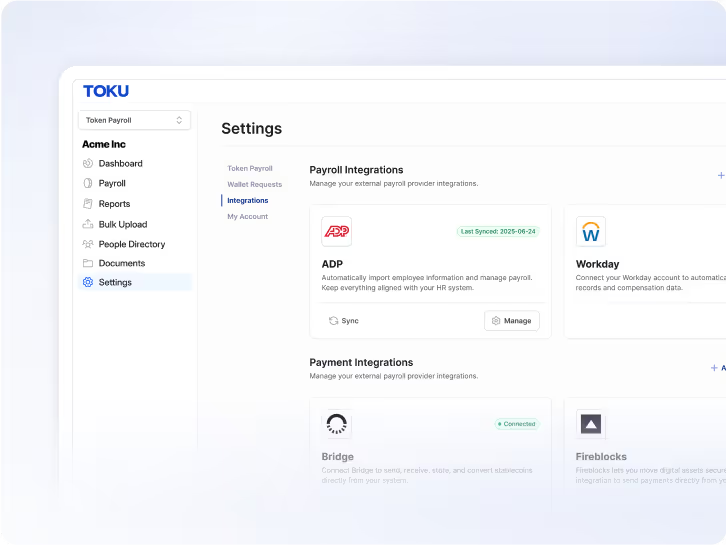
Toku adds USDC stablecoin payroll payouts to existing payroll workflows, with provider-specific setup, employee elections and reconciliation. Explore payroll APIs for stablecoin integration and how to add stablecoin payroll to ADP, Workday, Gusto or Rippling.
Book a DemoStablecoin-native payroll workflows designed for finance and payroll teams
Compliance-first controls and reporting readiness across 100+ countries
Global coverage for teams paying in fiat or stablecoins

ADP
How Toku Brings Stablecoin Payroll to ADP

BambooHR
How Toku Brings Stablecoin Payroll to BambooHR

Gusto
How Toku Brings Stablecoin Payroll to Gusto

NetSuite
How Toku Brings Stablecoin Payroll to NetSuite

Paychex
How Toku Brings Stablecoin Payroll to Paychex

QuickBooks
How Toku Brings Stablecoin Payroll to Quickbooks

Ramp
How Toku Brings Stablecoin Payroll to Ramp

Ripple
The Future of Payroll Runs on XRPL

Rippling
How Toku Brings Stablecoin Payroll to Rippling

Workday
How Toku Brings Stablecoin Payroll to Workday

Xero
How Toku Brings Stablecoin Payroll to Xero
Customer story · Figure
An existing payroll system, connected to employee payouts.
Figure uses Toku for a live Workday-integrated payroll flow involving YLDS. The published case shows an existing enterprise payroll workflow connected to payroll payment infrastructure.
Read Figure’s storyFor payroll operations and IT
Start with one payroll cycle.
Bring your current provider and configuration. Confirm the integration scope before choosing a first payment date.
Map the current flow
Identify the system of record, worker populations, payment methods, countries, payroll approvals, and finance reports. Confirm the provider product and configuration you use.
First working document: a flow map with data and responsibility owners.
Confirm the connection
Review supported interfaces, access requirements, data exchange, funding, and payment status handling. Agree who owns tax calculations, filings, and reconciliation for your setup.
Before implementation: a scoped integration plan and acceptance criteria.
Validate a complete cycle
Agree how to test approvals, payment outcomes, exception handling, and finance records before setting a production date.
Before launch: an agreed test cycle and operational handover.
Rollout guide · Payroll, finance and IT
Add a payment route without replacing your payroll software.
Use this planning checklist to scope a settlement change with your implementation team. It is not a universal setup procedure or a guarantee of availability in every country.
1. Record what stays in place
List your payroll product, countries, worker groups, pay calendar and current payment routes. Assign owners for gross-to-net calculations, tax filings, payslips and approvals. Changing settlement is not the same as replacing those responsibilities.
Before moving on: A current-state flow and responsibility map, approved by payroll and finance.
2. Confirm the provider-specific connection
Review the guide for your exact provider and product with the implementation team. Confirm data fields, access permissions, sync direction and the mechanism for payment instructions. Do not assume that one provider’s configuration applies to another.
Before moving on: An agreed interface and access scope, including which system can write each record.
3. Agree the payment choices and costs
Confirm country and worker eligibility, any required consent, available assets and networks, recipient details, funding deadlines and conversion terms. Identify payroll-service, payment, network and recipient fees separately. Confirm when the recipient can use the funds, not just when a network transfer settles.
Before moving on: A written scope, fee schedule and communication plan for the selected workers.
4. Rehearse the full cycle
Agree a test plan before moving real payroll. Cover worker changes, elections, approval, funding, payment status and reconciliation. Include rejected details, held payments and mismatched records. Compare expected amounts with payroll records and define who resolves each exception.
Before moving on: Documented acceptance criteria and a test record reviewed by payroll, finance and IT.
5. Approve the first live cycle
Choose a controlled first group and a launch date only after the agreed checks pass. Define a fallback payment process and decision deadline. Confirm payment status before retrying or using an alternative route so that a worker is not paid twice.
Before moving on: A launch decision, named support contacts and an exception escalation path.
6. Reconcile before expanding
Match payroll instructions, fees and payment references to the final records. Resolve differences and collect worker feedback before adding countries, assets or groups. Reconfirm scope whenever the provider configuration or payment route changes.
Before moving on: A signed-off first-cycle reconciliation and a decision on the next rollout group.
Use a documented provider example
The Workday guide describes a dedicated integration user, worker sync and a Toku payroll deduction. Review its setup requirements separately from any other provider’s configuration.
Read the Workday implementation guideAll Toku Integrations
- A3 Software
- ADP
- AFAS
- Aspel NOI
- BambooHR
- BrightPay
- Cegid
- Ceridian Dayforce
- Comarch ERP
- ContaAzul
- CONTPAQi
- DATEV
- Deel
- Enova365
- Exact
- Factorial
- Factorial HR
- GreatDay HR
- Greythr
- Gupy
- Gusto
- Hashavshevet
- Hilan
- Jurnal
- JustLogin
- JustPayroll
- Keka HR
- Lexware
- Loket.nl
- Malam Payroll
- Mekari
- Meta4
- Moorepay
- Netsis
- NetSuite
- Nmbrs
- Nomipaq
- Omie
- Oracle HCM
- Payboy
- Paychex
- PayFit
- Paylocity
- PayrollHero
- Personio
- PHC Software
- Primavera BSS
- Priority Payroll
- QuickBooks
- QuickHR
- Ramp
- Ripple
- Rippling
- Runa HR
- Runahr
- Sage
- SAP
- Senior Sistemas
- Sprout Solutions
- Symfonia
- Talenta
- TOTVS
- TriNet
- Wagepoint
- Workday
- Worky
- Xero
- Zirve
- Zoho Payroll
Stablecoin payroll FAQs
See Toku in action
Review your provider and payroll flow.
Bring your payroll provider, product configuration, worker locations, and payment requirements. Confirm fit and implementation scope with Toku.